
TiviMate Installation & Setup on Every Device
The industry standard IPTV player for Android TV, Fire TV & Google TV. Set up TiviMate with Apollo Group Tv in minutes — complete guide with Downloader code, APK link & Premium activation.
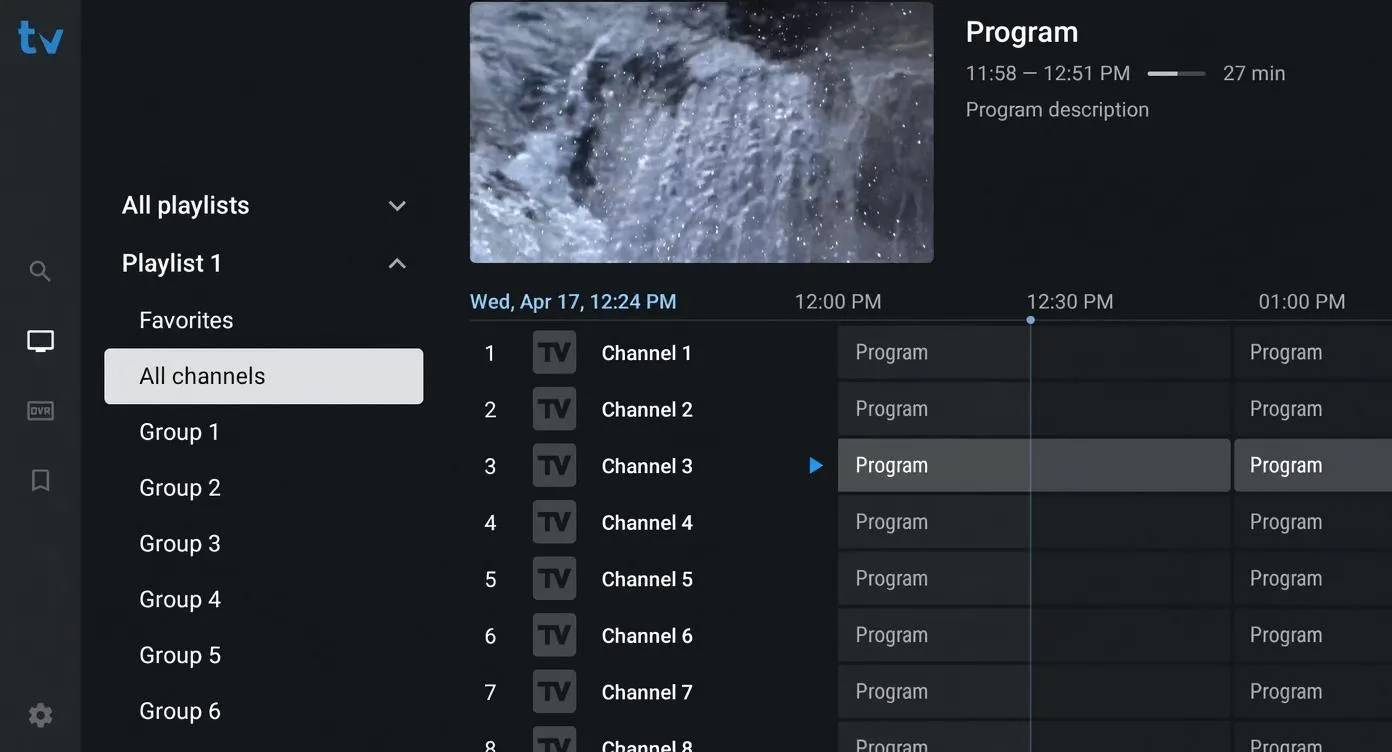
TiviMate is the industry standard IPTV player for Android-based devices — widely regarded as the most polished, feature-rich, and reliable player available. With its professional Electronic Program Guide (EPG), multi-view support, and DVR recording, TiviMate sets the benchmark that every other IPTV player is measured against.
Paired with an Apollo Group Tv subscription, TiviMate delivers 40,000+ live channels and 100,000+ on-demand titles in true 4K — with full EPG data, catchup support, and zero buffering. This guide covers everything: compatibility, installation using Downloader code 272483, Free vs Premium comparison, and the TiviMate Companion activation workflow.
“TiviMate Premium + Apollo Group Tv is the gold standard IPTV combination — a professional cable TV experience without the cable bill.”
- Downloader Code: 272483 — enter this in the Downloader app for instant installation on Firestick or Android TV.
- Direct APK:
https://files.tivimate.com/tivimate.apk— for manual sideloading. - Premium Cost: ~£29.99 one-time lifetime payment, supporting up to 5 devices simultaneously.
Compatibility: Supported & Unsupported Devices
Important: TiviMate runs exclusively on Android OS. It is not available on Roku, Apple, Samsung Tizen, or LG webOS. Check the table below before purchasing:
| ✅ Supported Devices | ❌ Not Supported |
|---|---|
| Amazon Firestick / Fire TV | Roku (all models) |
| Android TV (Sony, Philips, etc.) | Apple iPhone / iPad (iOS) |
| Google TV (Chromecast, etc.) | Apple TV (tvOS) |
| Nvidia Shield TV | Samsung Smart TV (Tizen OS) |
| Android phones & tablets (5.0+) | LG Smart TV (webOS) |
💡 On Samsung / LG / Roku / Apple? Use IBO Player Pro or IPTV Smarters Pro instead — they support a wider range of platforms.
The Entertainment Arsenal
Apollo Group Tv + TiviMate Premium: the most powerful IPTV combination for Android TV, Nvidia Shield, and Firestick.
How to Install TiviMate on Firestick & Android TV
The easiest method uses the Downloader app and code 272483. Follow the steps below:
Enable Unknown Sources
Go to Settings → My Fire TV (or Device Preferences) → Developer Options → turn on "Apps from Unknown Sources" and enable Downloader.
Install the Downloader App
Search "Downloader" in the Amazon App Store (Firestick) or Google Play Store (Android TV) and install it. It is free.
Enter Downloader Code 272483
Open Downloader, tap the URL/code field, and enter 272483. This will automatically navigate to the official TiviMate APK at https://files.tivimate.com/tivimate.apk and begin the download.
Install TiviMate APK
When the download completes, tap "Install". Once installed, open TiviMate. You can delete the APK file after installation to free up storage.
Add Your Apollo Group Tv Playlist
Open TiviMate → Add Playlist → M3U URL → paste your Apollo Group Tv M3U URL. Your 40,000+ channels and EPG data will load automatically within seconds.
TiviMate Companion App & Premium Activation
Activating TiviMate Premium requires a specific workflow using the TiviMate Companion app — you cannot purchase Premium directly on your TV device. Here is the process:
Download TiviMate Companion on Your Phone
Install the "TiviMate Companion" app on an Android phone or tablet from the Google Play Store. This app manages your TiviMate account.
Create an Account & Purchase Premium
Open TiviMate Companion, create a free account, then purchase the Premium lifetime plan (~£29.99). One account covers up to 5 devices simultaneously.
Log In on Your TV Device
On your Firestick, Android TV, or Google TV, open TiviMate → Settings → TiviMate Premium → Sign In. Enter the same account credentials from your Companion app to unlock all Premium features.
📖 Also looking for other players? See our HotPlayer guide, IPTV Smarters Pro guide, or IBO Player Pro guide.
Frequently Asked Questions
What is the TiviMate Downloader code?
The official TiviMate Downloader code is 272483. Enter this code in the Downloader app on your Firestick or Android TV to automatically download the TiviMate APK from https://files.tivimate.com/tivimate.apk.
Does TiviMate work on Roku, Samsung, or Apple TV?
No. TiviMate only runs on Android OS. It is not compatible with Roku, Samsung Tizen OS, LG webOS, Apple iOS, or Apple TV (tvOS). For those devices, we recommend IPTV Smarters Pro or IBO Player Pro.
How do I activate TiviMate Premium?
Download the TiviMate Companion app on an Android phone, create an account, and purchase the Premium lifetime plan (~£29.99). Then log in with those credentials inside TiviMate on your TV device. One account supports up to 5 devices.
Does TiviMate work with Apollo Group Tv?
Yes. Apollo Group Tv is fully compatible with TiviMate. Your M3U URL loads all 40,000+ channels, and EPG data populates automatically. Catchup and recording features are also supported.
How many devices can use TiviMate Premium?
One TiviMate Premium account supports up to 5 devices simultaneously — making it ideal for family households with multiple Android TV or Firestick devices.
Get Started with TiviMate Today
Pair TiviMate Premium with Apollo Group Tv — pure 4K, 9-screen multi-view, full EPG, and zero buffering. Instant activation.